Introducing Custom Hotkeys + "Hey Willow" Improvements (v1.2.13)
Made in v1.2.13 - v1.2.15
This release is a major upgrade to the way you interact with Willow Voice, especially if you’ve ever wanted more control over how dictation is triggered.
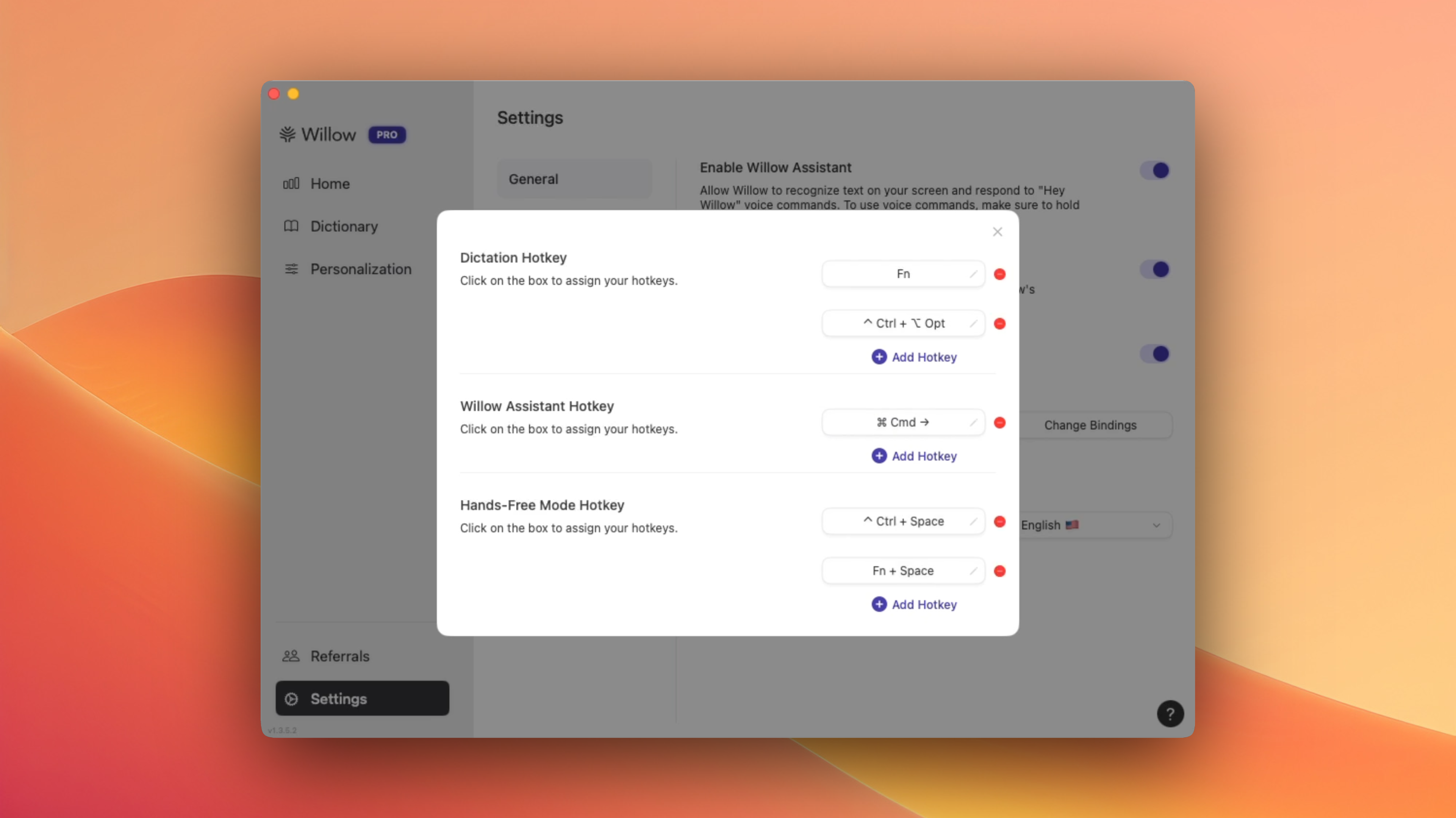
You can now set up multiple custom hotkeys, including one for hands-free mode and one for “Hey Willow” activation. This means you don’t have to rely on saying “Hey Willow” anymore—you can map the activation to a keypress and have full control over when dictation starts, even in noisy environments.
We’ve also removed the requirement to double-tap to enter hands-free mode. You can toggle it directly with your assigned hotkey, making the experience much smoother and more intuitive. And for those of you who love full customization, we’ve added support for F4 and F5 key bindings as well.
My Input: I'm personally a big fan of my set of key bindings, as shown in the key screenshot. Here's my explanation and how I'd recommend binding keys:
Fn for the default Mac keyboard works great (super reliable and easy to access).
On my external keyboard, I have bound Ctrl+Option as my way to default-start dictation. This makes it so my control and option key both work in isolation, but together they activate Willow.
Having the “Right Command” for Willow Assistant comes in handy whenever rewriting text. We've also revamped how Willow Assistant interacts with text, so it ends up being a lot less verbose, which will help with the complaints of sounding too much like ChatGPT.
For hands-free mode, I love adding the space combination to either Fn or Control. We override system-level shortcuts, so both of these are great!
Alongside these major features, we shipped a long list of bug fixes:
Fixed crashes when Willow processed certain apps
Made “Hey Willow” compatible with selected text (wasn’t working before)
Solved issues where double-tapping led to out-of-sync recordings
Improved the onboarding experience—extra steps now route you cleanly into the dictation app
Fixed a high-impact bug introduced in 1.2.13, where quick key taps would leak into the next recording. That’s been fully resolved now.
Added a clamshell diagnostic—if your Mac is closed or locked, we’ll toast and audibly notify you that Willow can’t access the mic
Finally, we now ignore disabled event taps, which previously caused rare background crashes
This set of updates gives you way more flexibility and reliability, both in how you use Willow and in how it performs behind the scenes.
More coming soon!
— Lawrence (CTO)